Q: What are the system requirements for devices, networks, and browsers for using the Optoma Whiteboard?
A; Optoma Whiteboard is designed for collaboration, but please keep in mind that there may still be limitations due to hardware configuration and/or minimum network requirements. Please refer to the recommended minimum system requirements and number of collaborators.
Q: How can I optimize performance in collaboration mode?
A: Please follow the tips below to improve the performance of your board when working with over 30 people or when you have a lot of media files and objects on a board.
The most common scenarios include slowness when moving the board, long loading times, or issues with viewing other participants’ cursors.
Performance tips
- Keep the number of heavy media files at a minimum – these include large videos, PDFs, and images.
- Don’t keep the preview windows open all the time. It’s best to close it when you’re not using it.
- For some entry level IFPD/FP devices, don’t go over the suggested 2 attendees in a single collaboration session. If you’ll be working with a larger group, we suggest using a web version to collaborate.
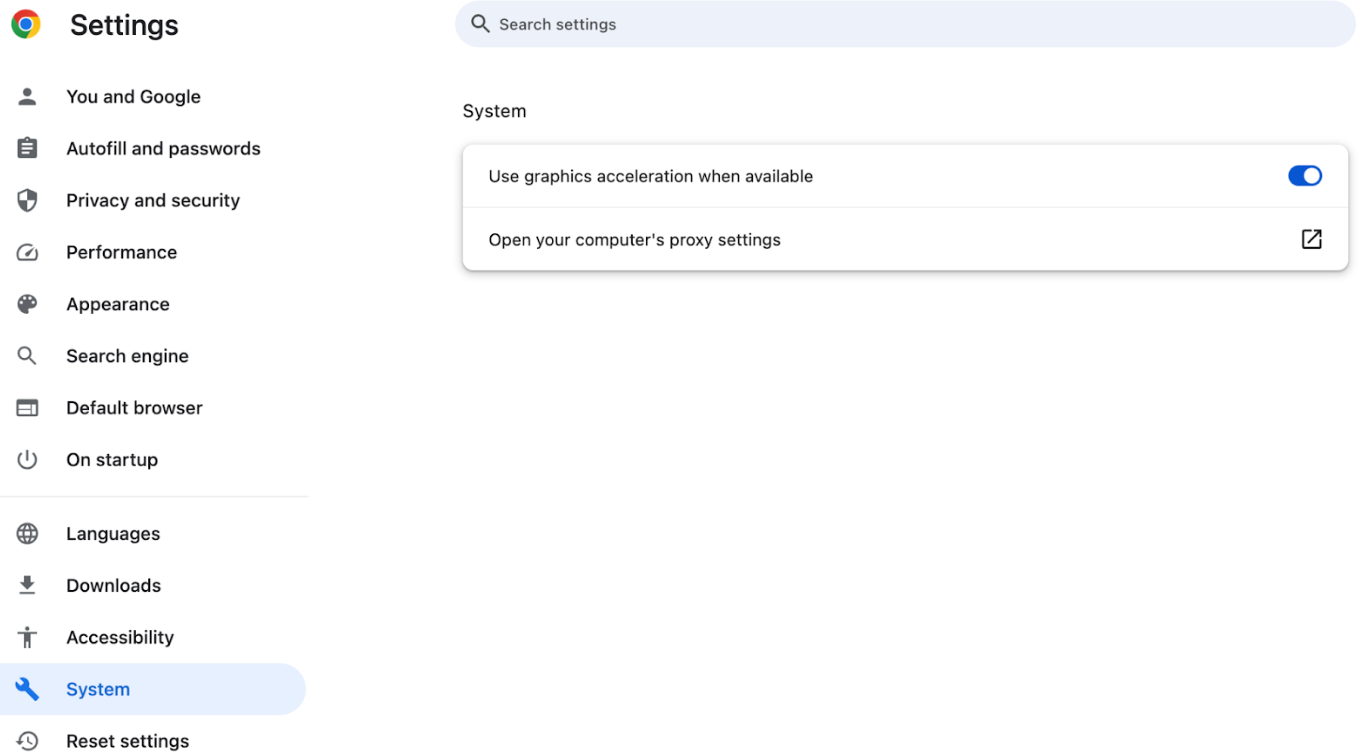
- Make sure hardware acceleration is turned on in your browser.
- Go to Settings and search for hardware acceleration, then turn that setting on.
It will help you use your computer resources and improve overall performance on Whiteboards and when browsing other pages.